3D Shooting Stage Builder
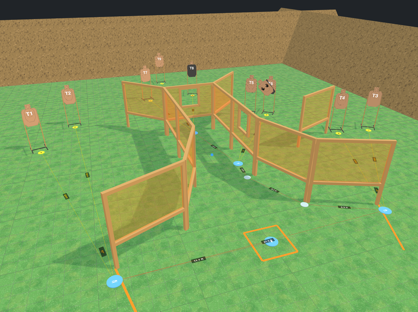
Open the 3D editor and you are already standing in a bay, ready to build. Drop in walls, targets, steel and barrels, set the moving targets running, then walk the stage and find the awkward transition now instead of on match morning.
Build it the way it stands
Everything sits on the ground at real size. Walls come with doors and windows that open the way you set them, and you can build your own wall shapes when the stock panels will not do. Targets, steel, barrels, furniture and vehicles snap into place, and targets can all turn to face a point you choose.
- GPA, IDPA, USPSA, IPSC, PCSL and ICORE targets
- Hard cover from the stock set, or draw your own
- Steel poppers, plates, plate racks, Texas Star and Polish plates
- Swingers, drop-turns, clamshells and other moving targets
- Stomp boxes and steel that start the moving targets and open doors
- Your own range, traced from satellite imagery, berms and all
Moving targets that really move
A swinger swings and settles like the real thing, and a clamshell gives you an exposure window you can measure. Set the timing and they run on your numbers. Wire them to a stomp box or a steel popper and the stage starts them when the shooter trips it.
Walk it, then run it at par
Walk the stage at par speed from the shooter's eye height. Sight lines are cast as real shadow, so the floor greys out exactly where the shooter cannot see. Then press Par Run and watch the stage run itself at GPA par, from the draw to the last shot.
Got a Meta Quest 3 or 3S? Press VR and shoot the stage at full size.
From the screen to the range
Print a build sheet that lists every wall, stand, target and piece of steel the crew needs to set it up. Frame a picture of the stage for the match book, print the stage sheet, or send anyone a link they can spin around and walk in their browser, with no account and nothing to install.
Questions
- Do I need to install anything?
- No. The 3D editor runs in your web browser. A headset is optional.
- Do I have to model my range first?
- No. Every new stage opens on a ready-made bay with berms, so you can start building right away. Tracing your own range from satellite imagery is there when you want it.
- Can I still make a 2D stage diagram?
- Yes. Every account also gets the 2D editor, and both share the same stage library, version history and match books.
- Can I try it before paying?
- Every account gets both editors free for 45 days with no card up front, then it is $12 a year.
Build your next stage here
Both editors free for 45 days. No card up front. Then $12 a year.
Start your free trial