GPA Stage Design Software
Pew Pew Stage Factory was built around GPA. Lay out the stage, mark where the shooter stands and what they engage, and the GPA par time works itself out as you go. When the stage is right, print the sheet or put it in a match book.
Par time while you build
The par panel counts what it can straight from the stage: targets, steel, total shots, headshots, moving targets, strong- and weak-hand shots, reloads, kneeling and prone positions, and stomp boxes. It updates every time you add or change something.
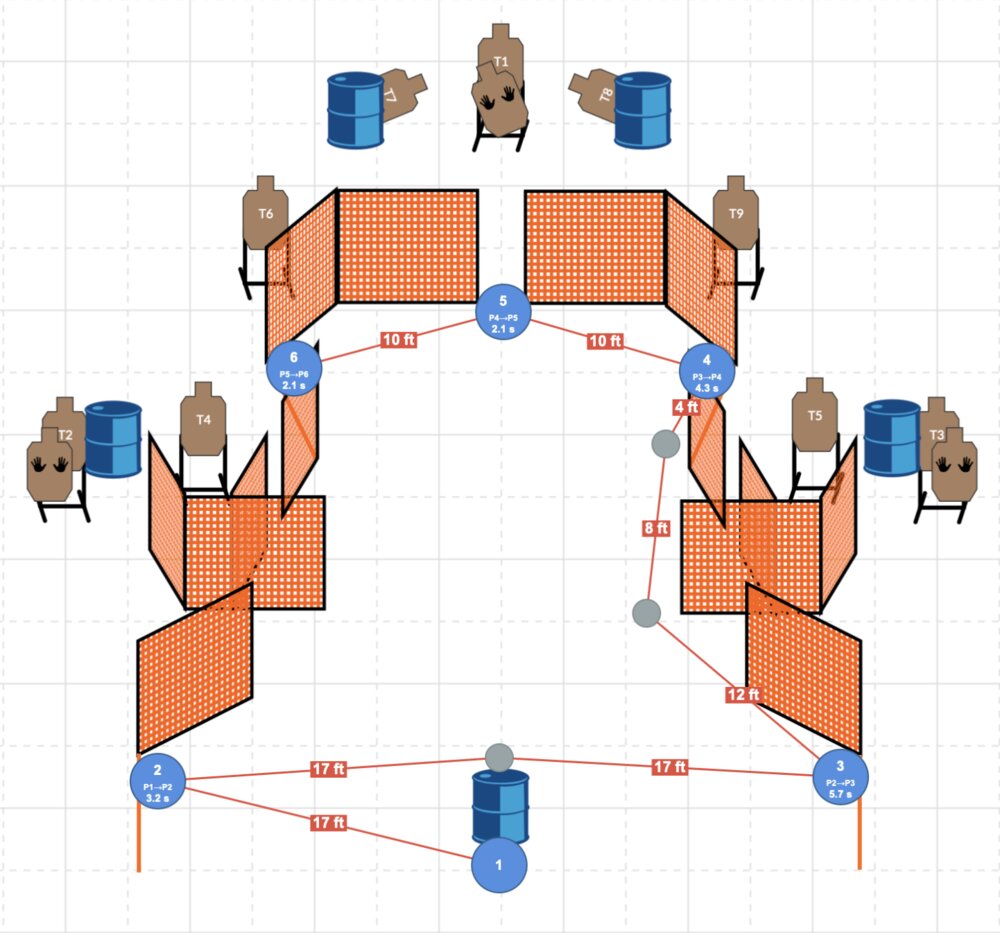
In the 3D editor it also measures the movement between your shooting positions, because it knows the stage's real scale. Want to check the math, or enter the numbers yourself? The par wizard walks through every factor one step at a time, including the ones a layout cannot show, like how the shooter starts.
Plan the run, then watch it
Drop shooting positions and waypoints, link the targets engaged from each one, and see the distances and movement times on the stage. Sight lines shade the floor wherever the shooter cannot see, so cover reads the way it will on the range.
In 3D, press Par Run and the stage runs itself at par: the shooter walks your positions, engages each target you marked, and finishes on the clock.
Shoot it against par
Put on a Meta Quest 3 or 3S and shoot the stage at full size. Wait for the beep, shoot it on a shot timer on your wrist, and the results card scores the run against the stage's par as a Score Index, adjusted for the division you pick.
Everything a GPA stage needs
- Cardboard targets, non-threats and hard cover
- Steel poppers, plates, plate racks and the Texas Star
- Walls with doors and windows, barrels and cover lines
- Moving targets that run on the timing you set
- Stage sheet with scenario, procedure and par, ready to print
- Match books shooters can read online or in print
- The GPA rulebook, searchable by topic, for every account
- A build sheet listing everything the setup crew needs
Questions
- Does it calculate GPA par time automatically?
- Yes. The par updates from the stage as you build it. In the 3D editor it also measures movement from your shooting positions. In the 2D editor you enter the distances you measured in the par wizard, and it finishes the par from there.
- Can I design a GPA stage without the 3D editor?
- Yes. The 2D editor is the quick way to sketch a stage, and it has the same GPA par panel, par wizard, shooting positions and print output.
- How do shooters see the stages?
- Put the stages in a match book. Shooters can read it on their phone or print it, and plan their own run on any stage without logging in.
- Can I try it before paying?
- Every account gets both editors free for 45 days with no card up front, then it is $12 a year. You can also try the 2D editor right now with no account at all.
Build your next stage here
Both editors free for 45 days. No card up front. Then $12 a year.
Start your free trial